


We will be parting for 13 spooky days! Add your site to Mr. Linky from Oct. 19th-30th for chances to win some fun prizes on October 31st.

Scroll down to see how I made this graphic- I’ve got directions and everything!!!
Contest Categories
- Best Original Costume FYI: I’m a sucker for family themes and funny pet costumes!
- Creepiest Yard Decor Does not have to be yours, take a photo of your neighbor’s yard if it’s good!
- Most Creative Party Idea This includes recipes, decor, games and crafts.
- Most BOOtiful Halloween Design This includes party invitations, cards and scrapbook pages.
- Most Bewitching Halloween Photo As long as it’s Halloween themed… anything goes!
Contest Rules: All entries must be something you produced, not a photo from a magazine or book. Family friendly entries only.
•••••••
Photoshop Tutorial
Want to see what my Halloween graphic started out as? Here it is straight out of the camera.
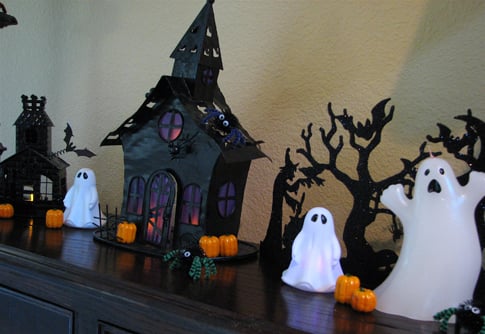
For Photoshop users, it is very easy to transform one of your very own photos. Try it with these directions.
1. First, click on the magic wand tool then click the background. In this case my yellow wall. This works best if you have a solid blank background. If you don’t, you may have to highlight the section you want to change by hand.
2. While your background area is highlighted create another layer and fill with the desired color. In my case blue. I then played around with the transparency to get it just right.
3. On another layer, make a circle for the moon. Fill it with your favorite moon color.
Want to save this for later?
4. Jazz up your photo. In my case, I grabbed one of the black bats (with the lasso tool) and duplicated it on another layer several times to go on top of the moon.
5. Add fog with the airbrush tool. I had to fade the transparency and blur this to make it look like real fog.
6. Add copy. Or not.
7. Create a background. This is from my Halloween Scrapbook Kit. You can download it for FREE HERE.
You should have a fun graphic when you’re done! Now click on the invite to join the party!!
Living Locurto …. the ramblings of a creative mom.
Want to see what fun I’ve been having lately? Read about my pumpkin party!
•

Click below to subscribe to Living Locurto.





Thanks for all the great info. I have elements 5.0, I’ve been wanting to upgrade to CS3. I bet it would be very useful for me as a photographer. I just know 5.0 and I’m afraid I won’t understand the latter. What is your opinion? Thanks again!!
I need a class in this!
Ooh, thanks for the tutorial! I love the way this came out. I’ll have to see if Gimp has similar features…
Oh this is incredible! Thank you so much for sharing this tutorial. Love it!
Cheers,
Madge
You are way savey with your Photo Shop 😀
…just wanted to stop by and see what is new here, always so much fun. When you get a chance come by {Litlle Shindigs} your fabulous little pumpkin shindig is up.
Oh count me in 🙂 We can’t wait to play!
What a fantastic tutorial! I’m a photoshop dummy but your instructions are so clear! Thanks!
Kimba
Can not wait!
Now to go get my pics of my stuff.
Fun!
You are the Photoshop Queen! I’ll need to read through your description 100 more times and then I might be able to do that. 🙂 I love the way it turned out though.
Angie in OH