


I’ve noticed many of you don’t have a photos showing up in my comment section. I thought I’d re-post this gravatar lesson. It’s a great blogging tip, plus I want to see your faces:-)
••••••
Ever wonder why your photo doesn’t appear next to your comments on some blogs? If you use Blogger and have an account, the photo shows up each time. But what about blogs powered by Wordpress and other companies? It’s probably because you haven’t set up your gravatar yet.
What is a gravatar you ask?
A gravatar, or globally recognized avatar, is quite simply an avatar image that follows you from weblog to weblog appearing beside your name when you comment on gravatar enabled sites.
One easy way to set up your gravatar is to sign up for a free account at gravatar.com
This will take you less than a minute and then I’ll be able to see your photo in my comments section! Yeah!
Want to save this for later?
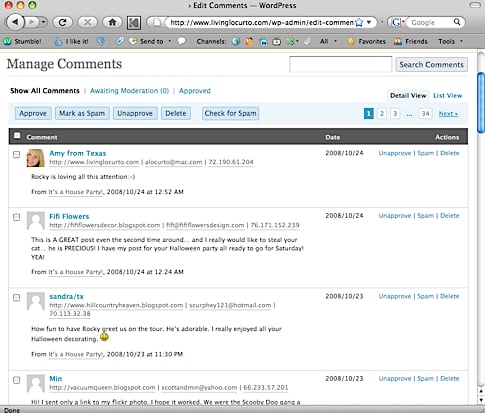
Your photo will automatically appear on other people’s comments also. Here’s a sample from Hooked on Houses.


Click below to subscribe to Living Locurto.




Great tip! Thanks!
Does my face look big in this? 😀
Thank you!
Barbara’s last blog post..Today we…
Did mine work?
Does it work? let’s see! Thanks for the tips. Juliet xx
This is one of the best tips you ever shared on your site Amy. I still remember how amazed I was the last time you shared it…I never had any idea why some people faces showed up and mine never did. Ha!
The Arthur Clan’s last blog post..Definite Improvement.
Hi Amy,
I remember these instructions from the last time…and that is how I got my handy dandy Gravatar, thanks!
I stumbled this post for you, too 🙂
Bella
Bella Casa’s last blog post..I Love HGTV’s Designed to Sell
Hmmm… I have blogger and I see in your example that my photo wasn’t there… I went to the site you mentioned and added a photo… I should be good to go NOW!
Happy New Year to you!
ENJOY!
Fifi
Fifi Flowers’s last blog post..New Year… Back to Painting…
Hi AMY, Hey I had an idea to send your way. Thanks for your visit by the way! My idea is this…you are sooooo good with downloads, what if you came up with some cute labels to put on files for filing or for organizing….or some type of cute lists templates for organizing. Not sure if this is possible. I love to make work more appealing to the eye obviously little lables, or to do lists, grocery lists, etc. You have such a great knack for putting things together…I don’t know how you do it but I enjoy it very much!
blessings
Debbie
Debbie’s last blog post..Roses for you!
And I’ll have to recomment once I actually do it! =)
Rachel’s last blog post..Daily DIY 2009.01.02
Great information! This has been on my to-do list FOREVER. I’ll be linking as well.
Rachel’s last blog post..Daily DIY 2009.01.02
Okay, I did it- not sure how pretty it will be- I seem a little “pixilated” not sure if that’s an actual word-
Thanks for the lesson-
Look at how pretty your photos are! Great to see you:-)
I always wondered how to have an avatar appear on websites that weren’t blogger related. THANKS!
P.S. LOVED the Christmas video … too cute!
MissCaron’s last blog post..Happy New Year
testing
Dot O’s last blog post..Holiday Bokeh
I just signed up and am awaiting the confirmation email. If you see my mug on the next entry on your blog, you’ll know I was successful.
Dot O’s last blog post..Holiday Bokeh